Cast to TV - Screen Mirroring
- 4.5
- Rating
- 1.00M
- Installs
- Free
- Price
 Analysis by App-foxy
I like Cast to TV - Screen Mirroring most when I need to move something from my phone to a larger screen without turning the process into a technical project. It is a free Android app from BoostVision in the video players and editors category, built around casting and mirroring rather than editing video itself. That distinction matters: its appeal is not a library of creative tools, but the convenience of using a phone as the starting point for watching, showing, or sharing content on a compatible television.
After spending time with it, my view is fairly clear. This is a useful everyday casting companion for people who regularly watch phone-based content on a TV, especially when their television setup includes devices such as Chromecast, Samsung TVs, or Fire TV. It can make a casual viewing session easier, but it should not be treated as a universal replacement for a television’s native apps, a dedicated streaming device, or a wired connection. Its real strength is reducing friction for simple screen-sharing tasks, not solving every compatibility problem.
What the app is really good at
I find the app most useful when the thing I want to share is already on my phone and the TV is simply the more comfortable place to watch it. In this section, I’ll focus on the small choices that make that handoff smoother, especially deciding whether to mirror the whole display or keep the session centered on one piece of content. That distinction helps set realistic expectations before you connect.
You May Also Like

 Blood Strike: 2.5 Anniversary
Blood Strike’s Loadouts Turn Every Drop Into a Tactical Gamble
A close look at Blood Strike’s custom loadouts: how fast access to signature weapons reshapes its battle royale rhythm, rewards preparation, and narrows the gap between fights.

 Pandora - Music & Podcasts
Pandora’s Music Is Easy to Start, but Harder to Recover
Pandora’s strength is its low-effort path from a seed to a station. Its weak spot is how much confidence it asks you to place in connection, setup, and quiet recovery.

 8 Ball Pool
 Is Built on Rivalries, Rematches, and Routine
A close look at the rivalries, rematches, shared routines, and unanswered safety questions that turn a quick pool match into a persistent mobile community.

 Samsung Music
’s Quiet Strength Is Playing What You Already Own
Its reach comes less from spectacle than from dependable access to a personal library. That simplicity is both the app’s strongest retention engine and its ceiling.

 AccuWeather: Weather Radar
AccuWeather Review: A Quick, Clear Forecast for Everyday Decisions
For everyday plans, the best forecast is the one you can understand quickly. AccuWeather makes rain timing, radar, and local conditions easy to act on, with a few trade-offs.

 Hill Climb Racing
Why Hill Climb Racing Still Turns Crashes Into One More Run
A tiny car, a bumpy hill and one more upgrade: Hill Climb Racing keeps resurfacing because its simple chaos makes every near-miss feel personal.
More From Our News Desk
View All News


A practical bridge between your phone and the television
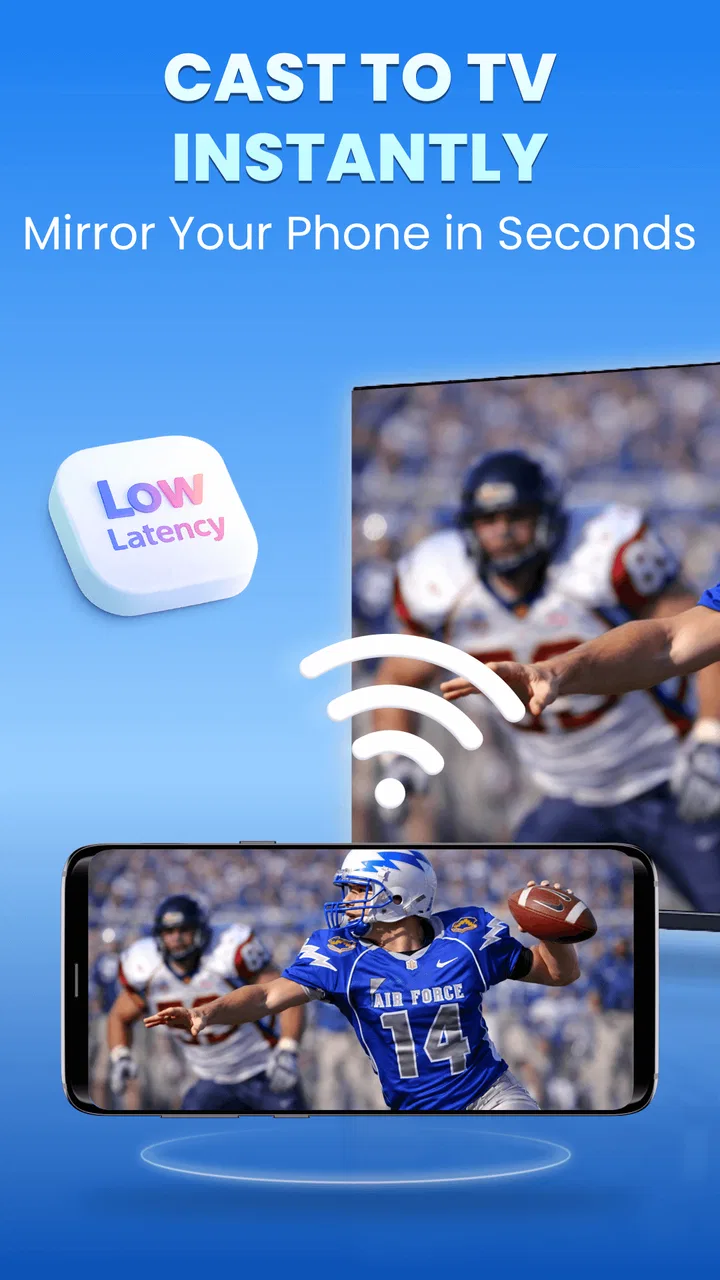
The basic idea is easy to understand. You open the app, look for a compatible display, and use the phone as the source for what you want to see on the larger screen. That can be more useful than it sounds. A phone is often where a short video, a photo, a presentation clip, or a social-media post first appears. Moving that material to a television can make it more comfortable to view and easier to share with other people in the room.
I find this especially handy in situations where the content is already on my phone and I do not want to search for the same item again through a TV interface. It also helps when a guest wants to show something from their own device. Instead of passing the phone around, the group can look at the television while the person holding the phone controls the session.
The app’s focus on HD screen mirroring gives it a more flexible role than a simple “send this one video” button. Mirroring can be useful for content that does not have a dedicated TV application, although the experience depends heavily on the receiving device, network conditions, and the material being shown. I would use it for browsing visual content together, demonstrating a mobile app, or displaying a saved clip. For long-form viewing, I would still prefer a native TV app when one is available.
Compatibility is the main reason to try it
The description points toward Chromecast, Samsung, and Fire TV use, which gives the app a broad practical target rather than tying it to one television brand. That is valuable for households with mixed equipment. Someone may have a Samsung television in one room and a Fire TV device in another, and a casting tool that can work across those environments is more convenient than maintaining a different method for each screen.
Still, “compatible” should be understood as a starting point, not a guarantee that every phone and television combination will behave identically. Casting depends on the receiving hardware and the local setup. If the TV does not appear, I would first check that the phone and television are connected to the same home network, that the correct input is selected, and that the receiving device is awake. These simple checks often matter more than changing settings inside the app.
A useful habit is to open the television’s own casting or screen-sharing area before launching the session. That makes the receiving end ready and can prevent the frustrating situation where the phone is searching while the TV is waiting on a different screen. I would also avoid testing it for the first time just before an important presentation or family gathering. A quick trial at home tells you whether your particular combination is cooperative.
Where it fits beside the usual alternatives
The normal alternatives are a TV’s built-in casting function, a native streaming application, a dedicated Chromecast-style workflow, or an HDMI adapter. Each has a different advantage. Native TV apps are usually better for stable, extended playback because they run directly on the television. A hardware-based solution can be more predictable for people who cast often. A cable is less elegant, but it avoids many wireless discovery and network issues.
This app makes the most sense between those options. It is more convenient than carrying a cable and more flexible than relying on one streaming service, while remaining less dependable than a direct TV app for every type of content. I see it as a bridge for occasional or mixed use, not as the foundation of a serious home theater setup.
That comparison also explains why the app may feel excellent to one person and unnecessary to another. If all your viewing comes from services already installed on the TV, you may gain little from adding a phone-based step. If you often receive links, clips, images, or mobile-only material, the app becomes much easier to justify.
A realistic evening use case
Imagine a friend sends a video to your phone while several people are sitting in the living room. On a small display, everyone has to lean in or wait for the clip to be passed around. With a compatible television ready, this app can turn that private phone moment into a shared viewing moment. The phone remains the controller, while the television becomes the comfortable screen.
That same workflow can help with travel planning. I might collect maps, property images, or short destination videos on my phone and show them to someone else on a larger display. It is not a replacement for a formal presentation system, but it is quicker than emailing everything to another device or searching for each item on the TV.
For remote work, I would be more cautious. Mirroring a phone can be useful for a quick visual demonstration, but small interface elements may not be pleasant to read from across a room. If the audience needs to inspect text, spreadsheets, or detailed documents, a laptop connected directly to the display is usually the better tool.
Small workflow choices make a noticeable difference
One non-obvious advantage of a phone-led casting workflow is that the phone can remain the place where I organize what I want to show. I can prepare the clip, image, or page before connecting, rather than trying to navigate a television keyboard with a remote. That saves time during informal sharing, particularly when the content is scattered across different mobile apps.
Another useful approach is to separate discovery from viewing. I first find the material, close unrelated apps, and then begin casting. This reduces accidental interruptions and makes it easier to tell whether a problem comes from the source content or the connection. It also keeps the session focused instead of turning the television into a mirror of every notification and screen change.
For a group setting, I would keep the phone close to the person who is presenting and avoid locking it immediately after starting. Screen mirroring and casting can behave differently depending on the receiving device and the way the source is handled. Keeping control in one place makes it easier to pause, switch content, or stop the session without asking someone else to take over.
What the current release says about accessibility
The app is listed for Android devices running version seven or newer, so it is not restricted to only recent phones. That broad system requirement is helpful if you are using an older spare phone as a remote source. The current version is 2.0.4, and the app has reached more than a million installs, with an average rating of 4.5 from roughly twenty-five thousand ratings. Those figures suggest that the basic idea has found a substantial audience, although they do not remove the need to test it with your own television.
It is free to install and carries an Everyone age rating, which makes it approachable for household use. There are in-app purchases ranging from $3.99 to $25.99 per item, so I would pay attention to the screens shown during setup and use before assuming every part of the experience is included without charge. For occasional casting, the free starting point may be enough; frequent users should decide whether any paid option is worthwhile based on how often they use the app.
The meaningful weakness: wireless casting is never just about the app
The biggest limitation is not something the app can fully control. Wireless screen sharing is sensitive to the entire chain: phone, network, receiver, television, and the content itself. A good app can make discovery easier, but it cannot guarantee a smooth session when the network is crowded or the receiving device handles mirroring poorly.
Mirroring can also expose the weaknesses of the original phone display. If a video is low quality, the larger screen will not magically improve it. If the phone receives a notification, that may become part of what is shown. I would turn on a distraction-free mode before mirroring anything personal or presenting to a group. This is a simple but important privacy habit, especially when the television is visible to several people.
There is also a difference between casting content and duplicating the entire phone screen. Direct casting may allow the television to handle playback more independently, while mirroring keeps the phone closely involved. That can affect battery use, multitasking, and how interruptions appear. Users who expect every streaming service to mirror perfectly may be disappointed because some services restrict or alter how their video can be displayed on another screen.
For that reason, I would not choose this app as my first option for a long movie night if the same service is already available on the TV. The native application is usually cleaner: fewer moving parts, less need to keep the phone active, and a remote designed for the television environment. The app earns its place when the material is mobile-first, temporary, or unavailable through the television’s own software.
Who should use it and who should skip it
I would recommend it to Android users who frequently want to show phone content on a compatible television and do not want to manage cables. It is a particularly sensible choice for households with more than one type of receiving device, because the appeal comes from having one phone-based approach for several screens. It can also suit people who share photos, short videos, or mobile pages with family and friends.
It is less suitable for someone who expects flawless professional presentations, plays competitive mobile games on a large screen, or wants a completely independent TV playback system. Mirroring may introduce delay, and even a small delay can make fast games feel wrong. For work that depends on readable text, precise interaction, or uninterrupted playback, a laptop, wired adapter, or dedicated presentation setup is safer.
I would also skip it if your television already handles all your viewing needs through reliable native apps and you rarely share phone content. Installing another tool in that situation may add another step without solving a real problem. The strongest reason to use this app is not that it replaces everything else; it is that it fills the gap between what is easy to find on a phone and what is comfortable to watch on a TV.
Practical advice before relying on it
Before an important use, I would test the exact combination of phone, network, and television. Confirm that both devices are on the same network, wake the TV or receiver, and try a short piece of content rather than beginning with a long session. If the connection is unstable, moving closer to the router may help, but the result will still depend on the quality of the home network and the receiving hardware.
I would also decide in advance whether I need full mirroring or simply want to send a particular video. Full mirroring is more flexible, but it exposes the entire phone screen and may be affected by notifications or other activity. A more focused casting workflow is preferable when privacy, battery life, or uninterrupted playback matters.
Finally, I would treat the phone as part of the viewing equipment. Keep it charged, avoid switching between demanding apps during playback, and remember that the session may stop if the source loses contact with the receiver. These are not dramatic obstacles, but they explain why the app feels best for short, informal, and interactive use rather than as a replacement for a dedicated entertainment system.
My final recommendation
Cast to TV - Screen Mirroring is a useful, focused app with a clear job: help move phone-based content to a larger compatible screen. BoostVision has aimed it at a common frustration, and the result is most convincing when I want to share something quickly rather than rebuild my viewing setup around a phone. Its support for Chromecast, Samsung, Fire TV, and similar environments gives it practical range, while the free entry point makes it easy to try.
My recommendation is positive, with a specific condition: use it as a flexible companion, not as a universal replacement for native TV apps or wired connections. If your daily viewing starts on your phone, it can save time and make group sharing much more comfortable. If you need perfect timing, maximum privacy, or dependable long-form playback, another method may serve you better.
In short, I would keep it installed for those moments when the phone has the content and the television has the better screen. It is at its best when convenience matters more than absolute consistency. That is a modest promise, but for casual casting, it is a useful one.
FAQs for Cast to TV - Screen Mirroring
01What is Cast to TV - Screen Mirroring used for?
Cast to TV - Screen Mirroring is an app that allows users to project their smartphone or tablet screen onto a larger display, such as a TV. This can be particularly useful for sharing videos, photos, games, and presentations with others, enhancing the viewing experience beyond the small screen of a mobile device.
02Is Cast to TV - Screen Mirroring compatible with all TVs?
Compatibility varies depending on your TV model. Most smart TVs with built-in casting capabilities or those connected to a casting device like Chromecast should work seamlessly. However, it's important to check if your TV supports the specific protocols used by the app, such as DLNA or Miracast, for optimal performance.
03Does Cast to TV - Screen Mirroring require an internet connection?
While an internet connection is not always necessary, it can enhance functionality. If your devices are on the same Wi-Fi network, casting should work smoothly. However, some features or streaming content from online platforms may require an internet connection, so it's advisable to have one available for full access.
04Are there any limitations on the types of content I can cast?
Generally, Cast to TV - Screen Mirroring supports a wide range of content, including videos, photos, and apps. However, some DRM-protected content from streaming services may not cast due to copyright restrictions. Always check if the specific content you wish to share is supported by both the app and your casting device.
05Is there a cost associated with using Cast to TV - Screen Mirroring?
Cast to TV - Screen Mirroring may offer a free version with basic features, but additional functionalities could be locked behind a paywall. Premium features might include higher resolution streaming, ad-free experience, or advanced settings. It's wise to review any in-app purchases to understand the full cost before downloading.
Pros
- Easy setup and connection process.
- Supports multiple media formats.
- High-quality video streaming.
- Compatible with most smart TVs.
- User-friendly interface.
Cons
- Occasional lag during casting.
- Limited free version features.
- Ads can be intrusive at times.
- Requires stable Wi-Fi connection.
- In-app purchases for premium features.

Cast to TV - Screen Mirroring
Gallery